


TOLL SUBSCRIPTION PLANS
FOR PRIVATE INDIVIDUALS

ELECTRONIC TOLL PLANS
FOR PROFESSIONALS
BIP&GO
SERVICES
OUR PARTNERS
TOLL SUBSCRIPTION PLANS
FOR PRIVATE INDIVIDUALS
ELECTRONIC TOLL PLANS
FOR PROFESSIONALS
BIP&GO
SERVICES
OUR PARTNERS
Find all the answers to your questions about electronic toll payment in our FAQs.

Subscription
What does it mean to reserve a parking space on the Bip&Go application?
Thanks to a partnership with Zenpark, a major player in parking reservation,you will be able to reserve parking in private car parks at a cheaper rate than on the streets in more than 200 cities in France and Belgium. In a few clicks, you can find and reserve your parking space from the Bip&Go application.
Two advantages: parking at the best price and payment without a credit card thanks to your Bip&Go account
The opening and closing of the car park is done directly from the application, thanks to the open and close button.
You will also have personal access codes that will allow you
to open and close the car park access (car gate, pedestrian access).
Do you have a question or a comment? Bip&Go customer service is available to help you with your reservation.
By phone at + (33)9 708 08 765 (no surcharge) from Monday to Friday from 8am to 7pm between 1 June and 30 September, then from 8am to 6pm the rest of the year (excluding French public holidays), and on Saturdays from 9am to 5pm.
From the website contact form Bip&Go : https://www.bipandgo.com/en/contact_form
How to book a car park from the application?
First, make sure you are logged in to your Bip&Go customer account from the application.
Please note: the booking feature is only available to private individuals and is not available for professional offers.
From the home screen:
- tap on "park me"
- if necessary, indicate the place where you wish to reserve a car park
- adjust your start and end dates and times of your reservation
- the car parks available for reservation are then displayed on the map
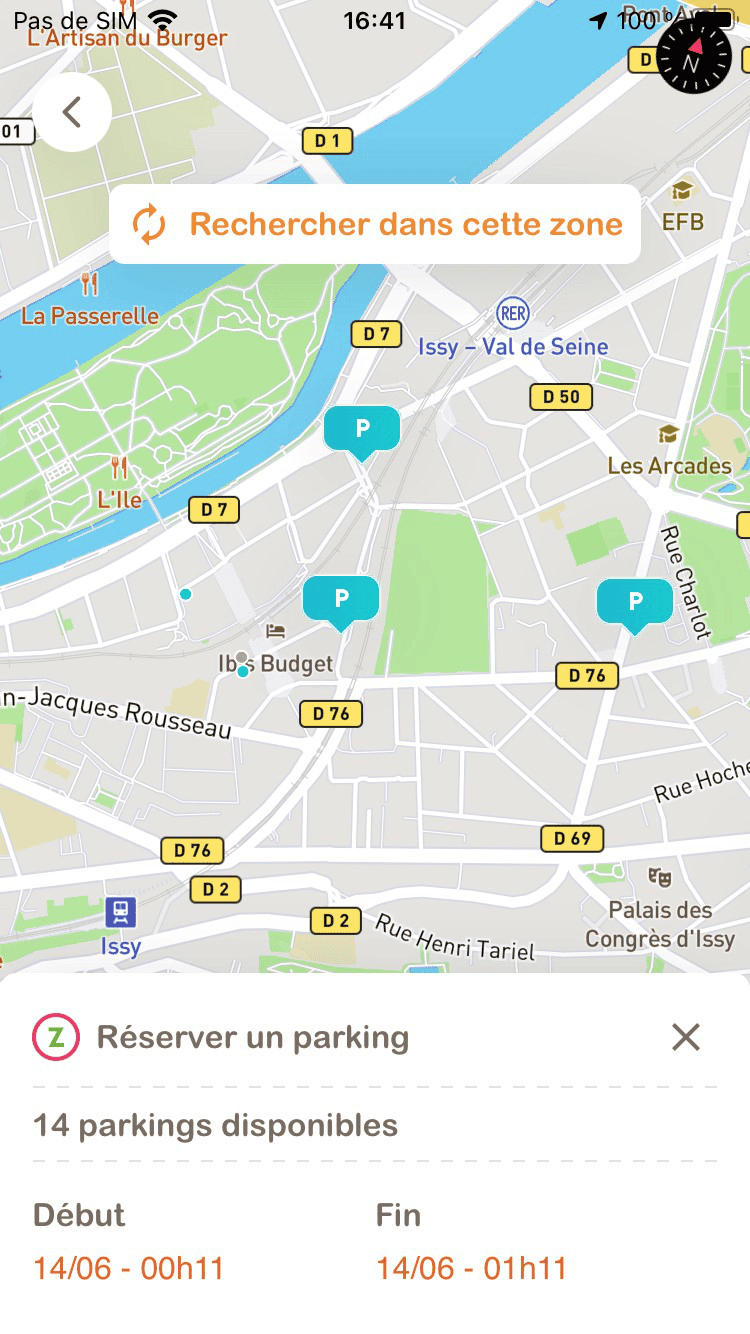
- select the desired car park
- then press book to see a summary of your reservation and confirm.
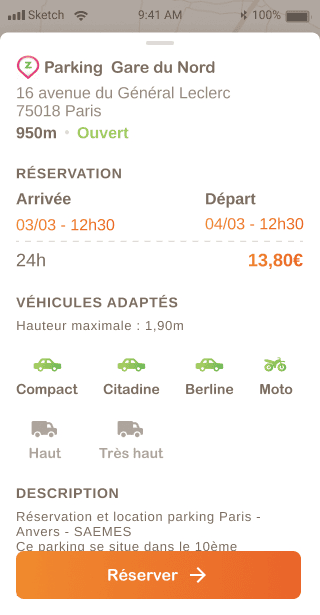
Please note: you must fill in at least one number plate corresponding to the vehicle used for parking in order to finalise your reservation.
Services for private individuals
© 2026 BIP&GO - All rights reserved


Services for private individuals

Services for professionals
Bip&Go services
About Bip&Go
© 2026 BIP&GO - All rights reserved



